

What a reusable markup tool is for.
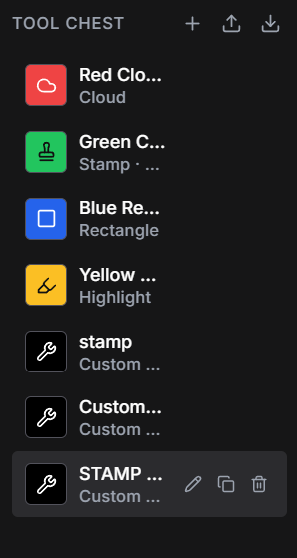
A saved markup tool keeps a commonly used annotation ready for another drawing or detail. In LayrPDF, the Tool Chest holds custom markups, stamps, highlights and drawing tools. It puts repeatable review tools in one place beside the drawing.
Think of a red cloud used to locate a query, a highlight used to identify a finish, or a note style used for a dimension check. Reusing the tool helps the comments look consistent. You still choose the location, the wording and what the comment means on that sheet.
Save tools that make the comment clearer.
A small collection is often easier to use than a long list of almost identical presets. Name tools by their purpose so you can find the right one while concentrating on the drawing. The examples below are ways a reviewer could organise a set; the colours do not carry an automatic industry meaning.
| Example tool | What to add on the drawing |
|---|---|
| Detail query cloud | A specific note explaining what needs clarification |
| Finish review highlight | The finish reference or transition being discussed |
| Dimension check markup | The dimension reference and the reason for checking it |
| Hardware query note | The fitting or location involved, rather than a generic question |
| Review stamp | Only the status the responsible reviewer is authorised to give |
An example from a millwork shop drawing.
An elevation shows an end panel beside a wall finish, and the reveal needs clarification. A saved cloud can identify the junction. A note such as “confirm reveal at wall finish” explains the question. On another elevation, the same cloud style might identify a hinge clearance query, with different wording.
The benefit is consistency across the drawing set: similar comments are easy to recognise, while the text stays specific to the detail. A generic stamp saying “check” would leave the next person guessing which part of the assembly needs attention.
The same idea applies to architectural coordination and interior design reviews. A familiar annotation style can locate a ceiling junction, a finish transition or a door detail. Include the relevant sheet or detail reference when the comment also concerns another drawing.
Keep the drawing readable underneath.
Before repeating a tool across a set, look at one placed example at a normal review zoom. Heavy lines, large clouds or opaque shapes can obscure the detail you are trying to explain. Text that looks fine close up may be hard to read when the whole sheet is visible.
Use words as well as colour. A reviewer should not have to guess whether red means a question, a rejected detail or simply your usual pen colour. Where a project uses agreed review conventions, match those conventions and describe any unfamiliar symbols.
Find the comments after you have made them.
Reusable tools help when you create markups. Layr's markup register helps when you need to find them later, with type, page, author and status information. A clear note remains useful both on the sheet and when someone returns to the review.
Keyboard shortcuts help with opening, saving and moving between drawings. Live PDF markups let collaborators review shared drawing sets together.
Layr is a paid drawing-review tool with a seven-day editing trial and no credit card or automatic charge. Solo costs US$35 a year or US$5 a month after the trial; existing work remains readable if you do not subscribe.
Common questions
What can I keep in Layr's Tool Chest?
The Tool Chest holds reusable custom markups, stamps, highlights and drawing tools. Choose the tool that fits the comment, then check its placement and meaning on the drawing.
Is a saved markup the same as a review status?
No. A reusable tool helps create an annotation. Review status is separate information about that comment. The tool's colour or appearance alone does not make a drawing approved.
Can saved tools help with cabinet and joinery drawing reviews?
Yes. Repeated clouds, highlights and notes can help identify hardware queries, finish transitions and details needing clarification. Keep each note specific to the drawing and use checked dimensions for measurement references.
Mark up, measure and review with LayrPDF.
Drawing tools, keyboard shortcuts, saved markups and live team review. Start with a 7-day editing trial.
Get LayrPDF