
What live PDF markup means.
A markup is a comment attached to a place on a drawing: a cloud around a junction, an arrow to a finish or a dimension beside an opening. With live review, those markups are shared through the project so collaborators can see the review develop without exchanging another attachment for every comment.
The drawing can stay in view while someone explains the detail. That matters when a note on a plan also refers to an elevation or section elsewhere in the set. Sheet references and comments keep the discussion connected to the actual drawing information.
Collaborative PDF annotation, with the reason beside the detail.
For a casework review, an arrow might identify the end panel while the note asks for the reveal at the adjacent wall finish. For an interior review, a cloud might locate a change in the reflected ceiling plan. For a site query, the same tools can show which opening or junction needs clarification.
Those examples are different decisions, but they share one need: the next person should be able to find the point being discussed. A specific note such as “confirm hinge clearance at this return” says more than a circle with no explanation.
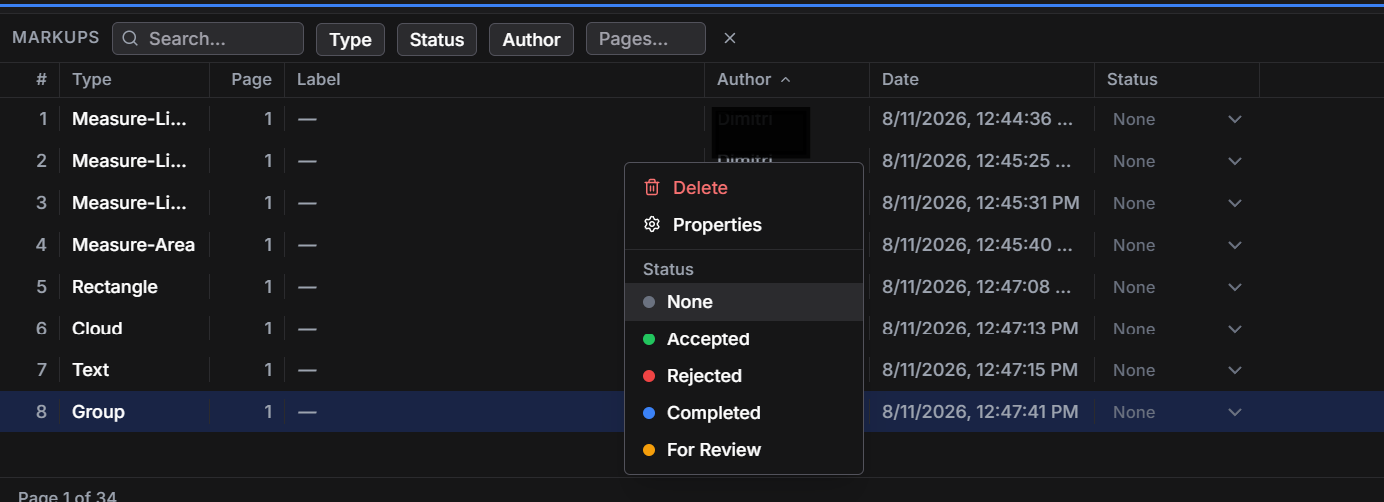
Layr's markup register helps locate comments by page, author and review status. Side-by-side comparison brings drawings into view together when you need to look at an earlier issue, an elevation or a related detail. The reviewer still decides what a change means.
Open the shared drawings in your browser on site.
Sign in through your browser to open and mark up shared projects. That gives a field reviewer access to the drawing conversation without treating every question as a separate emailed PDF.
Use the account that has access to the shared project and an internet connection for live collaboration. A person's software licence and access to a particular drawing set are separate things. Assigning a licence alone does not share your drawings with them.
The Windows desktop app can also review local PDFs. Those local files are not made into shared team projects simply by opening them. Adding a PDF to a shared cloud project uploads a copy for collaboration, so choose the drawings and people appropriate for the review.
Useful tools around the live conversation.
Live collaboration is most useful when the individual markup is easy to make and easy to understand. Layr combines shared review with the drawing tools you use on the page.
- Clouds, arrows, dimensions and notes identify the part of a drawing being discussed.
- Calibrated length and area measurements provide drawing references once the scale and units are checked.
- Counts record the items you identify in the drawing.
- Saved markup tools keep commonly used annotations close at hand.
- Keyboard shortcuts reduce repeated trips to the toolbar.
- The markup register and side-by-side comparison help with finding comments and reviewing related drawings.
Clear comments support a review decision.
A live comment does not make an instruction approved or a dimension correct. The team still needs the right drawing issue, clear review responsibilities and verified information for fabrication or installation. Layr gives that discussion a place on the PDF; your project determines how the final decision is issued.
For architects, contractors, interior designers and millwork teams, the useful question is whether everyone can locate the same detail and understand the comment. Shared markup makes that possible without changing the software you use to author the drawings.
Layr is a paid PDF review product. Solo is US$35 a year or US$5 a month, with a seven-day editing trial and no credit card or automatic charge. Compare the current plan inclusions if you are setting up access for a team.
Common questions
Is live PDF markup the same as sending someone a marked-up file?
No. A shared live project lets collaborators see markups through the project as they happen. Sending a PDF sends a file copy; it does not by itself give the recipient access to your live project.
Can the field team review drawings in a browser?
Yes. Layr supports opening and marking up shared drawings through authenticated browser access. The reviewer needs access to the project and an internet connection for live collaboration.
Are all my local PDFs automatically shared?
No. The Windows desktop app renders local PDFs on your computer. Adding a PDF to a shared cloud project uploads a copy for collaboration; opening a local PDF or assigning a licence does not do that automatically.
Mark up, measure and review with LayrPDF.
Drawing tools, keyboard shortcuts, saved markups and live team review. Start with a 7-day editing trial.
Get LayrPDF