

Choose the redline tool that explains the comment.
Redlining adds review marks to a drawing. It does not require every mark to be red, and it does not change the underlying CAD model. Keep any colours and symbols consistent with the review conventions your project team already uses.
LayrPDF includes clouds, arrows and callouts alongside text notes and measurements. A revision cloud can isolate the affected area; an arrow can point to the exact edge or junction; a callout can hold the explanation without covering the detail. More marks are not automatically clearer. Use enough to locate the issue and leave the relevant linework readable.
| Markup | Useful when |
|---|---|
| Revision cloud | A detail or small area needs attention |
| Arrow | The comment concerns one edge, point or junction |
| Callout or text note | The reason for the comment needs explaining |
| Dimension | A checked measurement helps explain a clearance or size query |
Replace vague notes with specific drawing comments.
A useful redline usually answers three questions: where is it, what needs attention, and what answer or change is needed? Name the detail, material or component when an arrow alone might be ambiguous. Keep a question separate from an instruction that has already been agreed.
These are sample review notes, not directions for a particular project. Replace the references with the ones in your drawing set.
| Vague note | Clearer review comment |
|---|---|
| Check this | Detail 4: confirm how the end panel meets the wall finish at this junction. |
| Wrong size | Cabinet C03: the plan and elevation show different opening widths. Confirm the required dimension. |
| Hardware? | Door D02: confirm the hinge model and its required clearance at the adjacent panel. |
| Finish | Panel P06: confirm whether finish F02 continues onto the exposed return. |
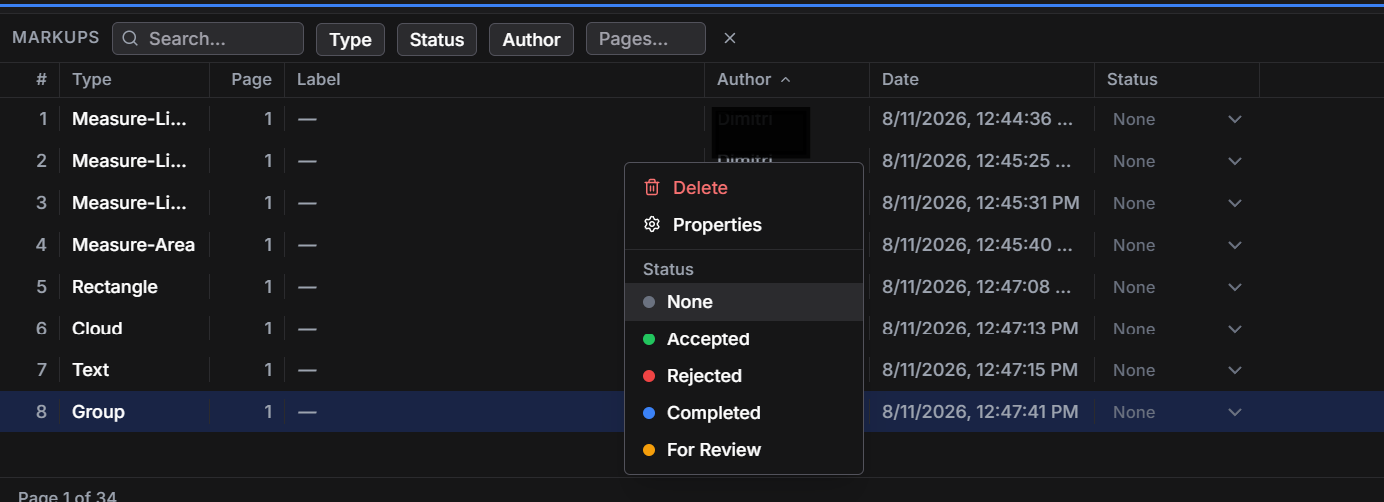
Use a drawing markup register to find the comments again.
A busy drawing review can spread comments across many sheets. Layr's markup register brings them into a list with type, page, author and review status information. Those fields help narrow the list when you need a particular sheet's questions or want to check comments at a particular stage.
Write comment labels that still make sense in a list. “C03 opening width” gives more context than “query”. If two separate questions need separate answers, give each its own markup so one completed item does not hide an unresolved issue.
A review status records progress on the comment. It is not, by itself, a contractual drawing approval or permission to manufacture. Record any required formal approval through the process agreed for the project.
Keep shop drawing redlines readable.
Place text beside the detail rather than over a dimension string. Check the markup at the size the recipient is likely to use; a note that looks fine when heavily zoomed in may be hard to read in the full-sheet view. If colour carries a meaning, explain it in words as well so the comment still makes sense on a monochrome print.
For repeated comments, saved markup tools can keep the appearance consistent, while keyboard shortcuts reduce repeated trips to the toolbar. Reuse the style; check the wording for each location. A standard note pasted onto the wrong detail creates another question to resolve.
Layr's seven-day editing trial needs no credit card and does not charge automatically. Solo editing costs US$35 a year or US$5 a month after the trial, and existing work remains readable. The same drawing-review tools can support local PDF reviews or live markups on shared drawing sets.
Common questions
What is a PDF redline tool?
It adds review comments such as clouds, arrows, callouts and notes to an existing PDF. For drawings, measurements and a searchable markup register can also help explain and track the comments.
Does a revision cloud explain the change on its own?
It locates an area that needs attention. Add a clear note when the reader also needs to know what changed, why it matters or what question needs answering.
Can I track redlines across a drawing set?
Layr's markup register lets you find review comments using fields including type, page, author and status. Use specific labels so each comment remains understandable away from the drawing itself.
Mark up, measure and review with LayrPDF.
Drawing tools, keyboard shortcuts, saved markups and live team review. Start with a 7-day editing trial.
Get LayrPDF