
01
High-performance PDF engine
- Smooth zoom up to 1000% on large drawing sets
- Stable rendering for complex CAD PDFs
- Fast, responsive panning and navigation
For contractors, drafters, designers, and architects
PDF markup and measurement software for people reviewing drawings. Add notes, measure to scale, compare revisions and share live markups with your team, from US$35 a year.
7 days of full editing. No credit card. No automatic charge.
Inside Layr
Real screens from Layr, from setting up sheets to tracking the review.
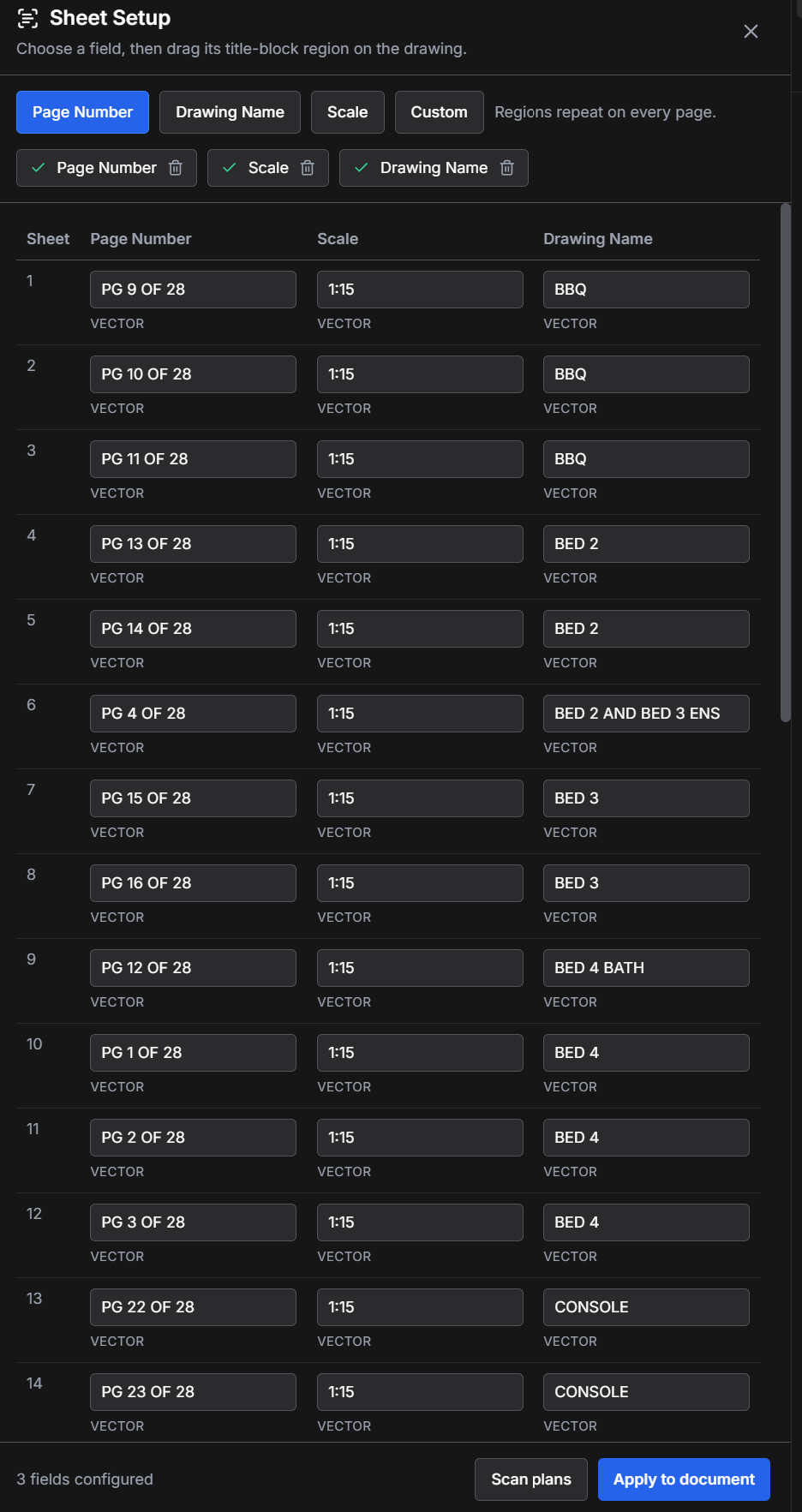
Sheet setup
Scan page numbers, drawing names, and scales across the set, then review everything before applying it.
Open full screenshot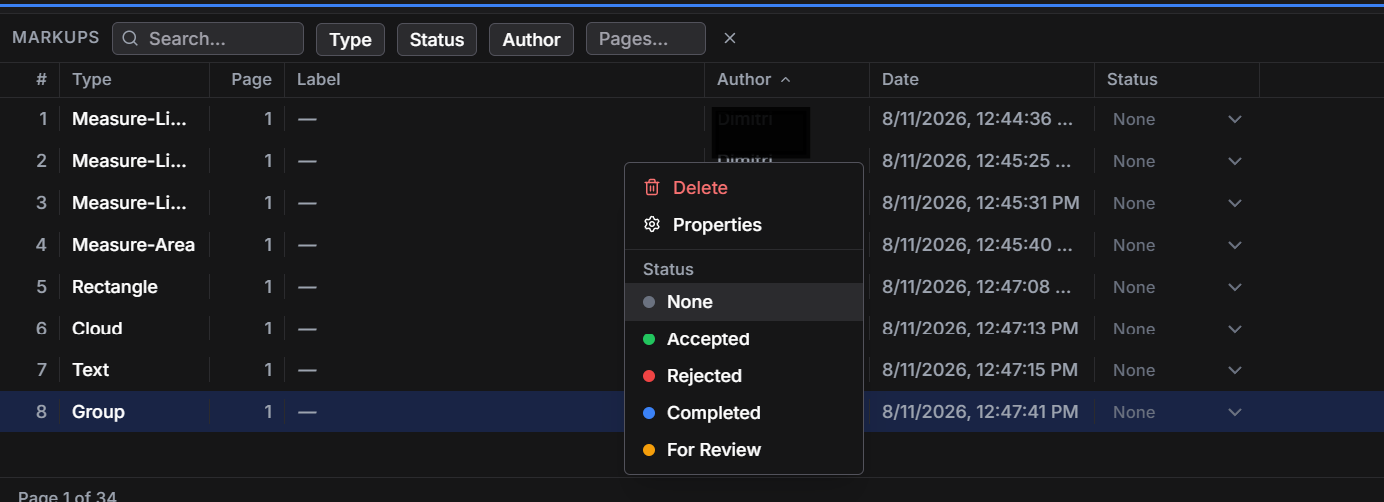
Markup register
Search by type, page, author, and status, then move work from review through completion.
Open full screenshot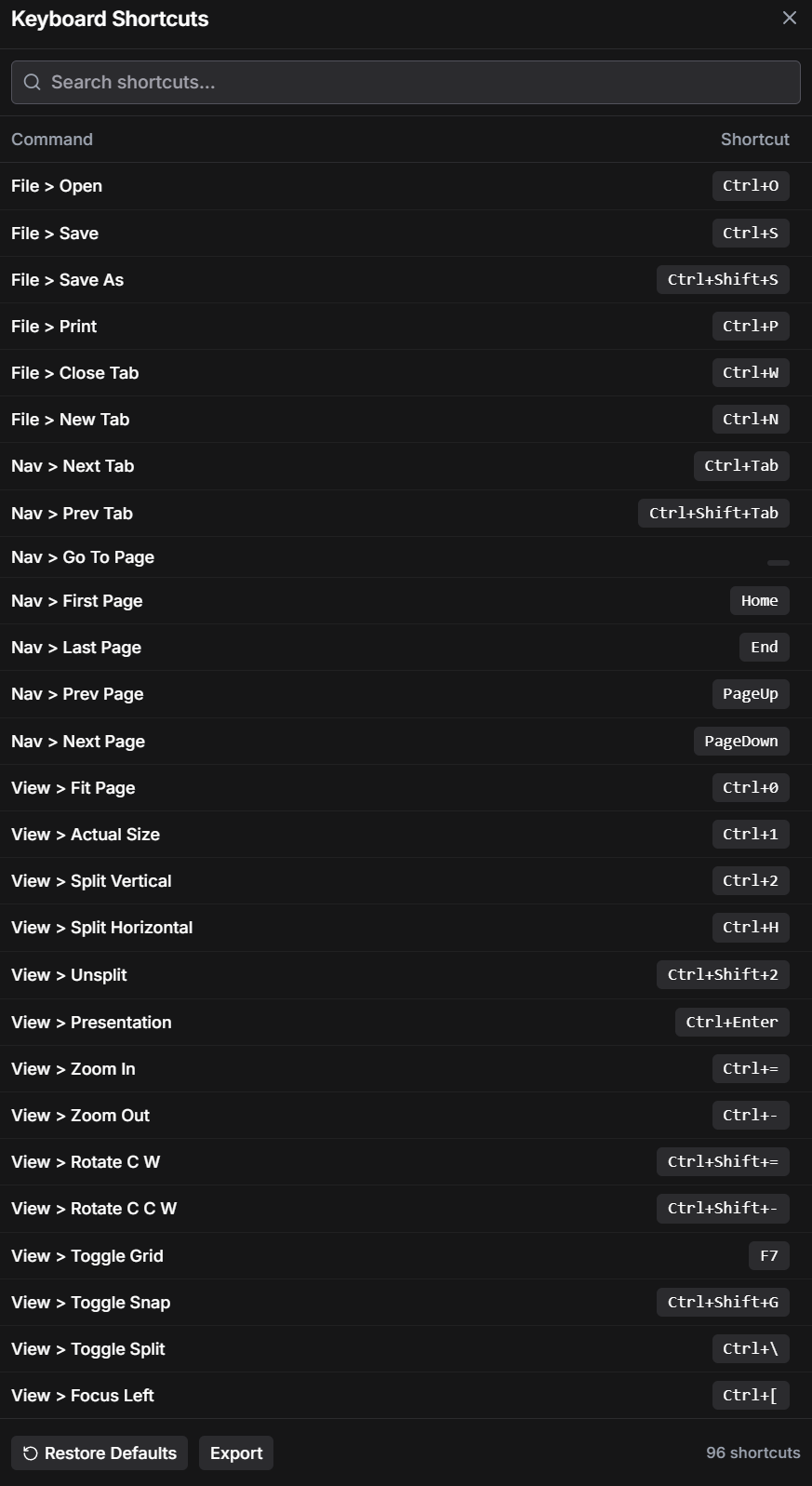
Keyboard workflow
Use familiar commands, search the full shortcut set, and keep common drawing actions close at hand.
Open full screenshot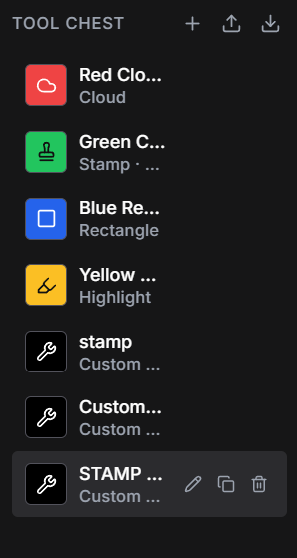
Tool Chest
Keep custom markups, stamps, highlights, and drawing tools ready for the next sheet.
Open full screenshotSpeed + serious work
Take off calibrated measurements, count areas, set up sheets, and mark up plans with a focused set of tools. Keep drawing review moving from the first sheet to the final handover.
Built for drawing work
Calibrate, measure, count, mark up, compare, save, and export without getting buried in generic document software.
01
02
03
04
05
06
Switching PDF tools?
Coming from Bluebeam or Acrobat? Test Layr with a copy of a real drawing set before changing your workflow. No need to start with a blank PDF.
Open your plans and check the existing annotations. Third-party markup support varies by annotation type.
Put drawings side by side in split view, then add clouds, notes, and calibrated measurements.
Review the markup register, save a copy, and open it in the PDF tools your team uses.
Layr is an independent product, not affiliated with Bluebeam or Adobe. Proprietary workflows and every annotation type are not guaranteed to transfer.
SIMPLE PRICING
Start free. Go unlimited for just $35 per year.
Desktop and browser access are included with every paid subscription.
| What’s included | |||
|---|---|---|---|
| Markups | 7-day editing trialOne trial per account | ✓ Unlimited | ✓ Unlimited |
| Viewing | Unlimited | Unlimited | Unlimited |
| Windows desktop app | ✓ | ✓ | ✓ |
| Web access | View shared drawings and markups | ✓ | ✓ |
| Browser appDraw and mark up without installing the desktop app | — | ✓ | ✓ |
| Local offline use | ✓ | ✓ | ✓ |
| Cloud project storage | — | 25 GB included | 25 GB per user, pooled |
| License assignment | — | One person per licence | Manage purchased seats |
Prices in USD. Taxes may apply. Cancel anytime.
A note from the founder
I’m Mitch, a millworker turned drafter and freelancer. I work with drawings, revisions, measurements, and the back-and-forth that comes with getting a job ready for the workshop.
I needed a straightforward way to review PDFs, mark up changes, check dimensions, and send clear notes back. There were good tools out there, but I couldn’t justify spending $300 a year on another subscription. The cheaper options never quite did what I needed.
So I started building Layr.
It comes from the work I actually do, not a wish list of features nobody asked for. My aim is simple: make the everyday drawing work easier, keep the price sensible, and build something that other tradespeople, drafters, and freelancers genuinely find useful.
Why switch
Layr keeps the drawing review loop direct: open the set, do the work, share it, and move on.
Your trade. Your drawing workflow.
Before you start
Practical answers about files, accounts, and installation.
Check the tools you use on real drawings: scale calibration, measurements, clouds, notes, revision comparison and shared review. Also check the ongoing price and whether editing is only free during a trial. Layr includes a seven-day editing trial, then Solo costs US$35 a year or US$5 a month. Existing work remains readable after the trial.
In the Windows desktop app, PDFs you open from your computer are rendered locally. Opening a local drawing is separate from adding it to a shared cloud project.
Adding a PDF to a cloud project uploads a copy so project members can access it. Shared PDFs and project data are stored online for that collaboration. Keep confidential drawings local unless you are authorized to share them; contact us if you need specific retention or deletion requirements confirmed.
Sign-in, cloud projects, collaboration, downloads, and account verification need an internet connection. The desktop app can work with local PDFs offline, subject to your license and its verification requirements. Offline use does not replace a valid license.
Check the download page for the current Windows version. Close Layr and run the latest installer to update your installation; you do not need to uninstall first. Back up important project files before updating.
Your Layr account holds your sign-in and cloud account information. Purchases and subscriptions are handled by our payment provider. The desktop app also keeps local session and license information. Our privacy policy explains the services involved; contact us if you need a particular data region or compliance arrangement.
Layr can open PDFs created with those tools and supports importing and editing supported PDF annotations. Test a copy of your drawings and check the saved result with your team. Proprietary tools, workflows, and all annotation types are not guaranteed to transfer.
SmartScreen checks download reputation as well as digital signatures. A newly released, signed installer can still be described as unrecognized. A signature is not a promise that Windows will show no warning.
Download only from our official download page. If you see a warning, keep Windows protection enabled and contact support with the version and a screenshot before proceeding. On a managed work computer, ask your IT team. Read Microsoft's explanation.
Free trial
Start your 7-day trial with Google or an email link. No credit card needed.
Want occasional product updates?
Occasional product and release updates. Unsubscribe at any time.
Vote on what we build next.
PDF drawing review
Compare an affordable Bluebeam alternative, understand free PDF markup tools, and get practical help with drawing measurements and live team review.
Looking for an affordable Bluebeam alternative for drawing review? Explore LayrPDF's markup, measurement, comparison and live team collaboration tools.
Read the guide PDF measurement guideLearn how to calibrate a PDF drawing, measure distance and area, check mixed scales and spot scan distortion before relying on a drawing measurement.
Read the guide Drawing revision reviewCompare PDF drawings side by side, match the right sheet revisions and record changes clearly. A practical guide for construction and shop drawing reviews.
Read the guide PDF keyboard shortcutsUseful LayrPDF keyboard shortcuts for opening, saving and comparing drawings. Move between sheets, fit the page and use split view during PDF review.
Read the guide